Posted on
/
By
Clay Thomas
Shinkansen WiFi is one of the first things travelers should look up before hopping on Japan's bullet train, and for good reason. You've got a two-hour ride from Tokyo to Osaka, you need to navigate, check your next hotel, or just kill time with a video. So the big question is: will the internet actually work?
The short answer is yes, free WiFi is available on Japan's Shinkansen. But how well it works is a different story. You might have a great experience, with and easy set up and solid connection, or you may have data speeds and connectivity issues the entire ride.
I personally do not keep the Free Shinkansen Wifi option as my only choice for data. Keeping a strong eSIM for Japan ready, and available to handle the larger tasks is the best way to make sure you stay connected on your trip.
Don't believe me? Let's take a look.
Does the Shinkansen Have Free WiFi
Free WiFi is now standard across all major Shinkansen lines in Japan. Whether you're riding from Tokyo to Osaka or heading up toward Sendai, you can expect to find some form of wireless internet onboard. The service is free for all passengers, no special pass or ticket required.
That said, availability doesn't always mean reliability. More on that in a bit.
Which Lines Have Shinkansen WiFi
The Tokaido, Sanyo, and Kyushu Shinkansen lines all use a shared service called Shinkansen Free Wi-Fi, operated jointly since 2018. This covers some of the most popular routes for foreign travelers, including Tokyo to Kyoto, Osaka, and Fukuoka.
JR East operates its own service called JR-EAST FREE Wi-Fi on its lines, which includes the Tohoku, Joetsu, Akita, Yamagata, and Hokuriku Shinkansen (the Tokyo to Kanazawa stretch). The Hokuriku Shinkansen is a bit of a split situation since the section beyond Joetsumyoko falls under JR West, which uses a separate network.
The Hokkaido Shinkansen also has WiFi available, though coverage can be patchier given the remote terrain it travels through.
How to Identify WiFi-Equipped Cars
Not every single car may be labeled the same way, so look for the Shinkansen Free Wi-Fi sticker posted near the doors when you board. This sticker indicates the service is active in that car.
The good news is that WiFi is available across all seating classes. It doesn't matter if you're in a standard non-reserved seat, a reserved car, Green Car, or Gran Class. Everyone gets access.
How to Connect to Shinkansen WiFi
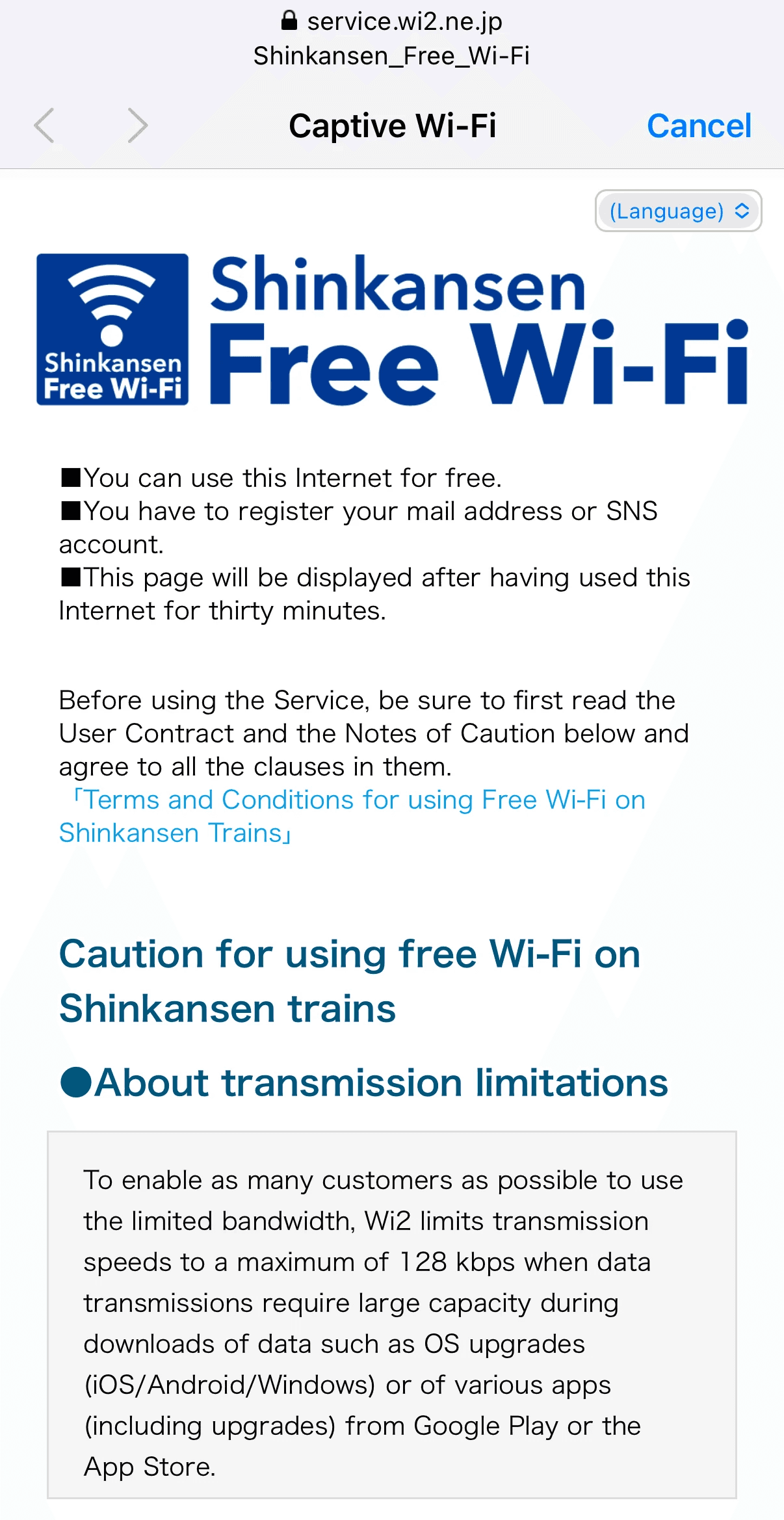
Connecting is pretty simple. You don't need to download an app or set anything up in advance, though having your email address ready will speed things up.
Connection Steps on the Tokaido, Sanyo, and Kyushu Lines
Open your device's WiFi settings
Select Shinkansen Free Wi-Fi from the available networks
Open your browser. A login page should appear automatically
Authenticate with your email address or a social media account (X or Facebook)
Click the confirmation link sent to your email to finalize the connection
You're in. One thing to know: each session lasts 30 minutes, after which you'll need to reconnect. It's a slight inconvenience, but it is free and easy enough to rejoin.
Connection Steps on JR East Lines
Select JR-EAST FREE Wi-Fi or SHINKANSEN FREE Wi-Fi from your WiFi settings
Register with an email address or social media account
The process is nearly identical to the other lines. One difference: after 21 days from your initial registration, you'll need to re-register. For a short trip, this won't matter at all.
Shinkansen WiFi Reliability: What to Realistically Expect
Here's where things get honest. Free onboard WiFi is a welcome feature, but it comes with real limitations that a lot of travel guides skip over. These guides tend to focus on skipping over the useful parts like the "why", and the "how". Well, not this time.
Why Connections Drop in Tunnels and Mountains
Japan's geography works against consistent WiFi. Around three-quarters of the country's landmass is mountainous, and the Shinkansen cuts through a lot of it. Long tunnel sections are common on routes like Tohoku, Hokuriku, and Kyushu.
At speeds exceeding 300 km/h, the train is constantly handing off between cell towers along the route. Each handoff is a brief window where the signal can dip or drop entirely. I have personally seen data speeds go from 100mbps to 1mbps in an instant. One moment, great connection, the next, none. In tunnels, that window extends until the train emerges on the other side, so you could be without connection for some time.
This isn't a flaw in the system. It's just the reality of running a wireless signal through challenging terrain at high speed.
Shared Bandwidth and Speed Limitations
Personally, this is the biggest issue with relying on the Free Wi-Fi option. The WiFi on the Shinkansen is a shared network. Every passenger on that train is pulling from the same connection at the same time. During peak travel hours or busy holiday periods, that bandwidth gets divided fast.
Speeds are enough for basic browsing, maybe sending a message, or checking maps. But streaming video, downloading files, or making video calls can be unreliable. Large downloads like app updates or OS updates are actually restricted on some lines to keep the network usable for everyone.
On my most recent Shinkansen trip, I tried to connect my laptop to the Free Shinkansen Wi-Fi hoping to handle a few task and reply to emails, but I wasn't able to get a connection. Even following the correct steps, the wi-fi continued to search but unfortunately was never able to connect.
In short, don't count on Shinkansen WiFi for anything that needs a stable, fast connection.
Using Mobile Data on the Shinkansen
Now this is where most guides leave a gap. Free onboard WiFi is available, but it's not your only option. Your own mobile data connection can actually perform better in a lot of (if not most) situations.
How 4G and 5G Perform on Bullet Train Routes
Japan's major carriers maintain strong 4G coverage along the Shinkansen corridors. The routes between major cities like Tokyo, Osaka, and Hiroshima are well covered. You'll hit brief dead zones in long tunnels, but for the bulk of the journey, a cellular connection holds up well.
5G coverage is expanding along these routes too, particularly in urban stretches. If you're on a 5G-capable device with a local Japanese plan, speeds can be noticeably faster than the shared onboard WiFi.
Why a Japan eSIM Gives You More Consistent Shinkansen WiFi Access
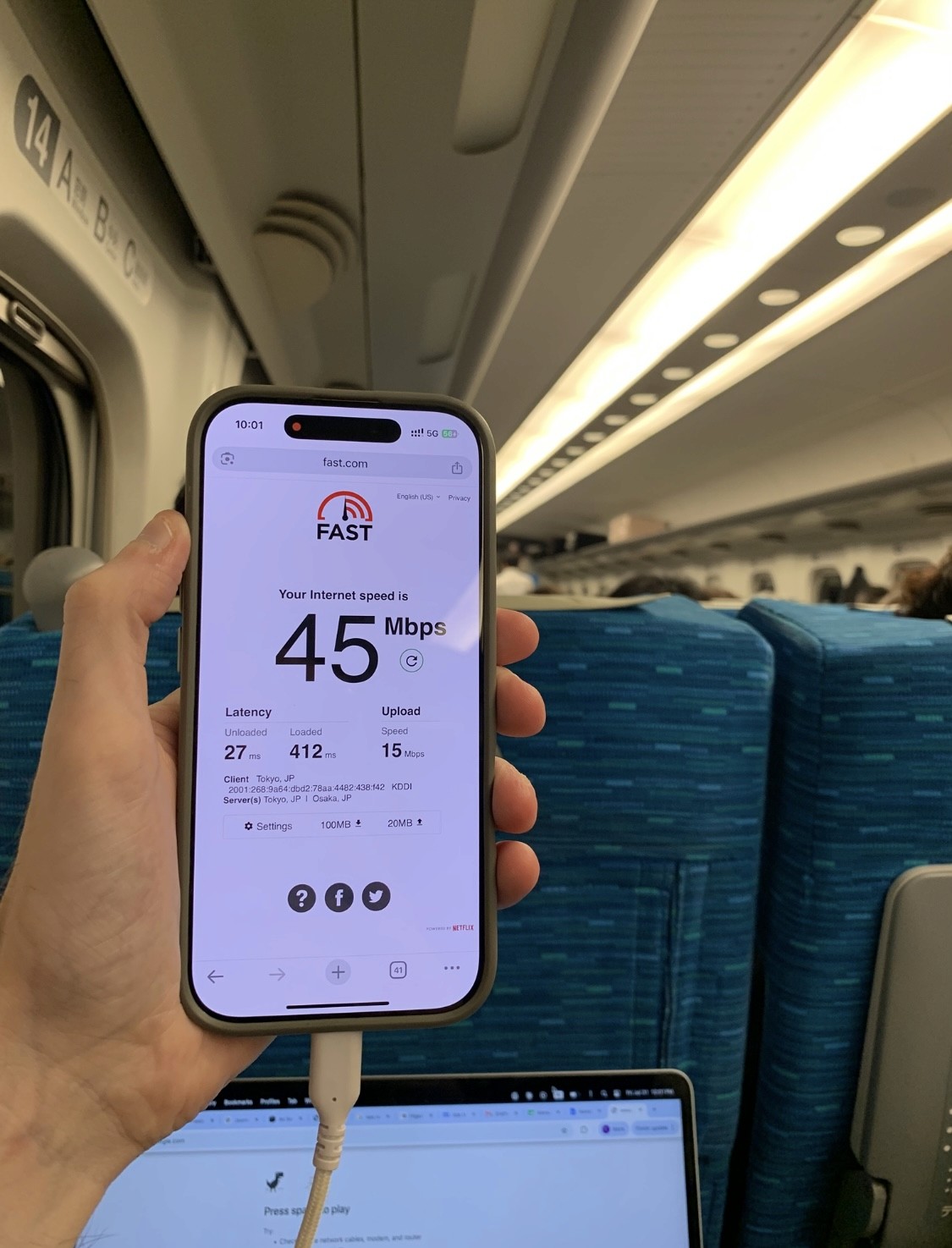
A Japan eSIM running on a reliable, local network like Docomo or KDDI allows you your own private data connection. You're not sharing bandwidth with 200 other passengers. You don't have to re-authenticate every 30 minutes. And when you exit a tunnel, your connection picks right back up without any steps from you.
For navigation, messaging, looking up the next stop, or just staying connected throughout the ride, using a Japan eSIM is a cleaner experience. There's no extra device to carry, no pick-up desk at the airport, and no return process to deal with. Activate it before you leave home, and it connects automatically once you land in Japan.
Free Onboard WiFi vs. Your Own Data Connection
Here's a direct comparison to help you decide how to handle connectivity on the Shinkansen.
Connection Option | Shinkansen Free WiFi | Japan eSIM |
|---|---|---|
Cost | Free | Paid Plan |
Reliability | Varies (tunnels, congestion, not wanting to connect) | Consistent cellular coverage and speeds |
Session Limits | 30 minute re-logins | Always On |
Setup | Required each time | Active |
Connection Type | Shared with all passengers | Your own private connection |
Peace of Mind | Not Always | Yes Always |
For light browsing or quick lookups, the free WiFi gets the job done, and if you're weighing pocket wifi as another option, there's a full breakdown worth checking out. For anything that needs a stable connection, your own data is the better call.
Tips for Staying Connected Throughout Your Japan Trip
A few things worth doing before and during your trip to avoid connectivity headaches.
Download offline maps before you board. Google Maps lets you save areas for offline use. This is a lifesaver in tunnels or anywhere your signal dips. Apps like Maps.me also work well for offline navigation.
Use your eSIM data for the things that matter. Some Japan eSIM plans also support hotspot sharing, which is useful if you're traveling with others. Navigation, messaging, and real-time bookings should run through your own data connection. Treat the onboard WiFi as a backup for casual use.
Keep your devices charged. Most Shinkansen cars have power outlets, usually near the window seats in standard cars and at the armrests in Green Car. Bring a cable and top up during the ride.
Activate your eSIM before you leave home. A Japan eSIM can be set up and installed while you still have WiFi access. When you land at Narita or Haneda, it connects automatically. No scrambling at the airport.
Save your authentication info. If you plan to use the onboard WiFi, keep the email address you registered with handy. You'll use it again when the 30-minute session ends.
Conclusion
Shinkansen WiFi is free, accessible across all major lines, and works well enough for casual use during your ride. The limitations are real though. Shared bandwidth, 30-minute session resets, and tunnel drop-outs mean it's not something to rely on for navigation or anything time-sensitive.
For consistent connectivity on the bullet train and throughout Japan, pairing the free onboard WiFi with a reliable Japan eSIM is the smart move. You get the best of both without carrying extra hardware or dealing with complicated setups.
That way, whether you're riding the Tokaido Shinkansen or exploring beyond the major cities, staying connected with Shinkansen wifi on your terms is one less thing to worry about.
Frequently Asked Questions (FAQs)
1. Is the Shinkansen WiFi completely free?
Yes, Shinkansen WiFi is free for all passengers. You just need to connect to the correct SSID and complete a quick email or social media registration to authenticate.
2. How long does each Shinkansen WiFi session last?
Each session lasts 30 minutes. After that, you'll need to reconnect using the same registration details. There's no limit on how many times you can reconnect during a single journey.
3. Does the WiFi work on all Shinkansen lines?
WiFi is available on all major lines, including Tokaido, Sanyo, Kyushu, Tohoku, Joetsu, Hokuriku, Akita, Yamagata, and Hokkaido. The SSID name and operator may differ depending on the line, but the process to connect is essentially the same.
4. Can I use a Japan eSIM while on the Shinkansen?
Yes. A Japan eSIM works independently of the onboard WiFi and gives you your own cellular data connection throughout the journey. It stays connected through tunnel exits without any re-login steps.
5. What should I do if the Shinkansen WiFi isn't working?
First, check that you haven't hit the 30-minute session limit. If that's not the issue, try reconnecting from your WiFi settings. In tunnels or mountainous areas, signal interruptions are normal and usually resolve once the train clears the section. If you need a reliable connection, switch to your mobile data.